
Automated Guest Access
Guest Access is a provider-approved, delegated access method that allows Arcadia to securely manage and maintain a separate login to your utility provider. Not all providers have instituted Guest Access access but, for those that do, it's often a secure, efficient way to work around MFA access limitations. This guide explains how Guest Access works, how to manage your connections, and how to interpret connection health.
Overview
Unlike standard credential-based connections that rely on customer owned logins and multi-factor authentication (MFA), Guest Access enables Arcadia to route security challenges to a dedicated, Arcadia-managed email address. This allows us to automate recurring MFA requirements, resulting in a more resilient and maintenance-free data connection.
Key Benefits
- Reduced Maintenance: Avoid frequent re-authentication caused by MFA session expirations.
- Higher Reliability: Direct, provider-approved access channels provide more consistent data retrieval.
- Automated MFA: Security codes are sent to and handled by Arcadia-managed email addresses, bypassing your inbox.
How It Works
Opting In
Guest Access is an opt-in feature configured at the organization level. Contact your Account Manager to opt in. Once enabled, Arcadia will attempt to create a Guest Access login for any supported provider where you have credentials.
- Credential Entry: You provide your standard utility login.
- Automated Setup: Arcadia uses your credentials to log in, navigate to the provider's Guest Access section, and invite a unique Arcadia email address.
- Invitation Acceptance: Arcadia automatically accepts the invitation and completes the registration process with the provider.
- Recurring Access: Arcadia will utilize your credentials to fetch data until the MFA access expires. Once your initial access expires, we will then default to the Arcadia managed Guest Access to retrieve data.
Reconciling Accounts
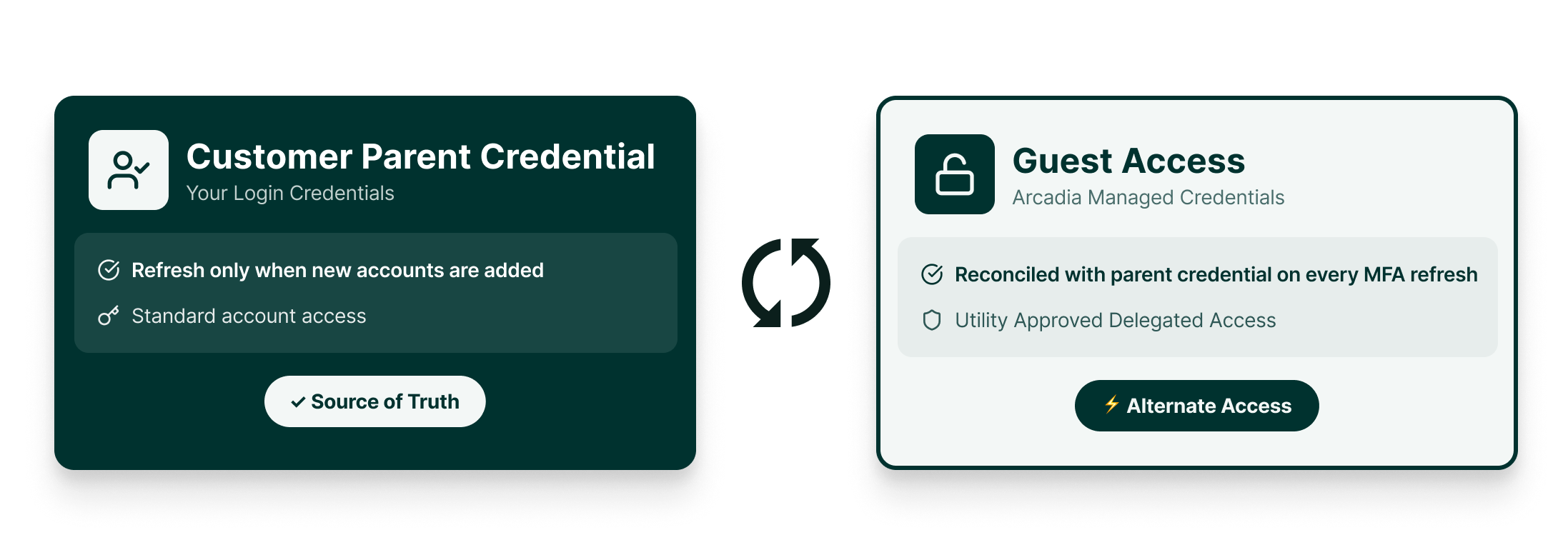
The customer owned credential is the source of truth for expected account data. Each time we fetch data using the customer owned credential, we will refresh and reconcile our Guest Access to ensure we have access to all expected accounts.
You can see the last time an account was refreshed using the lastRefreshedAt field.
If a new account is added to your credential, you will need to ensure your credential connection is in a successful state.
Arcadia will not have visibility to newly added accounts without explicit permission from the customer credential. We update the permissions for newly added accounts every time we run the customer owned credential through our refresh and reconciliation logic in an automated fashion.
Supported Providers
Check out the Provider page to see which providers support this feature today!
Status, Status Details, and Connection Health
Status and Status Detail
Guest Access is an alternate credential to access account data. The Guest Access logins have a status and status detail in the same way that credentials do to convey their state. For all credentials with an activated, non-failure Guest Access login, the status will be ALTERNATE_ACCESS. Any credential in this state does not need to be monitored by customers.
If the Guest Access login is deactivated or in a terminal failure state, the status will reflect the credential's true state: CONNECTION_SUCCESS, CONNECTION_IN_PROGRESS, CONNECTION_FAILURE, CONNECTION_DEACTIVATED.
| Status Detail | Definition | Recommended Action |
|---|---|---|
| GUEST_ACCESS_CONFIGURATION_IN_PROGRESS | The initial setup of the Guest Access login is in progress. | No action required. Wait for the configuration process to complete. |
| GUEST_ACCESS_SYNC_INCOMPLETE | A temporary failure occurred during the reconciliation between credential and Guest Access login. | No action required. Arcadia will retry the synchronization. |
| GUEST_ACCESS_CONFIGURATION_FAILURE | Arcadia failed to set up the Guest Access login for an eligible provider. | Update customer credential for quicker resolution times or wait for Arcadia to resolve the Guest Access connection issue. |
| GUEST_ACCESS_NOT_SUPPORTED | The provider does not support Guest Access for your specific account type. | Use customer credentials to maintain the connection as Guest Access is unavailable. |
| GUEST_ACCESS_REMOVED | Guest Access was deactivated because the customer organization opted out of the feature. | Request to opt in to the feature to restore access. |
Connection Health
Connection health "flattens" the state of your credentials and the Arcadia managed Guest Access into a single connection health status. This value reflects the the true state of data acquisition for data behind the credential.
| Connection health | Definition | Recommended Action |
|---|---|---|
| Success | Data is being fetched successfully through either the customer credential or Guest Access login. | No action required. |
| In Progress | The credential and/or the Guest Access login are working to fetch data. | Wait for Arcadia to complete data retrieval. |
| Failure | Neither the credential nor the Guest Access login are able to access provider data. | Refresh your MFA one time password (OTP) to unblock the accounts immediately or wait for Arcadia to resolve the Guest Access failure. |
| Deactivated | The credential is deactivated. No data is flowing. | Reactivate the credential to receive data again. |
If your credential has an activated, non-failure Guest Access login, the
isCustomerActionRequiredflag will always be false! Use this to determine which credentials, accounts, meters, and webhooks to take action on!
Handling Edge Cases
New Account Synchronization
If you add a new utility account to your login, the existing Guest Access login may not automatically see it. To sync new accounts, you may need to re-authenticate your credentials in the Arcadia Dashboard to trigger a "reconciliation" process.
Mixed Account Support
Some providers only support Guest Access for certain account types. For example, Duke Energy supports Guest Access for commercial and business accounts, but not for residential accounts. In these cases, the connection will fall back to using your credentials. The statusDetail will reflect GUEST_ACCESS_NOT_SUPPORTED.
Managing Access
- Deactivating Access: If you deactivate or delete your credential, the associated Guest Access login is also immediately deactivated or deleted.
- Opting Out: If your organization opts out of the Guest Access feature after previously being opted in, any existing Guest Access logins will be set to
isActive=false, and Arcadia will return to using your credentials for data fetching only.
Updated 6 months ago